
Let AI Work. Keep Thinking.
- series
- AI & Experience
- published date
- 2026.10.13
Let AI Work. Keep Thinking.
You use AI to build a tool through vibe coding. In another window, you ask it to organize user research findings. Meanwhile, a separate agent handles competitor analysis. With three tasks running at once, you might expect to be three times as productive.
But when the results arrive, it can be hard to know where to start. You scan the outputs and think, “This looks good.” Then doubt creeps in. Is the work actually good, or does it simply look convincing?
Why can delegating work to AI leave us feeling more tired?
AI reduces the effort of creating, but leaves the work of evaluating
When you create a wireframe yourself, you know why each element is where it is. You have worked through the information structure, considered how users will scan the screen, and decided what takes priority.
When AI delivers a finished layout, you have to work backward to understand those decisions. Why is this button here? Why does this information come first? Even if the output is similar, you have less context for evaluating it.
Understanding and assessing AI-generated work takes mental effort of its own. As AI reduces the effort required to create, the work of evaluation becomes a challenge in its own right.
A five-step workflow
Working effectively with AI means considering both how quickly it can produce results and how quickly we can understand and evaluate them. We need a workflow that gives us room to exercise our judgment, even when AI does much of the work.
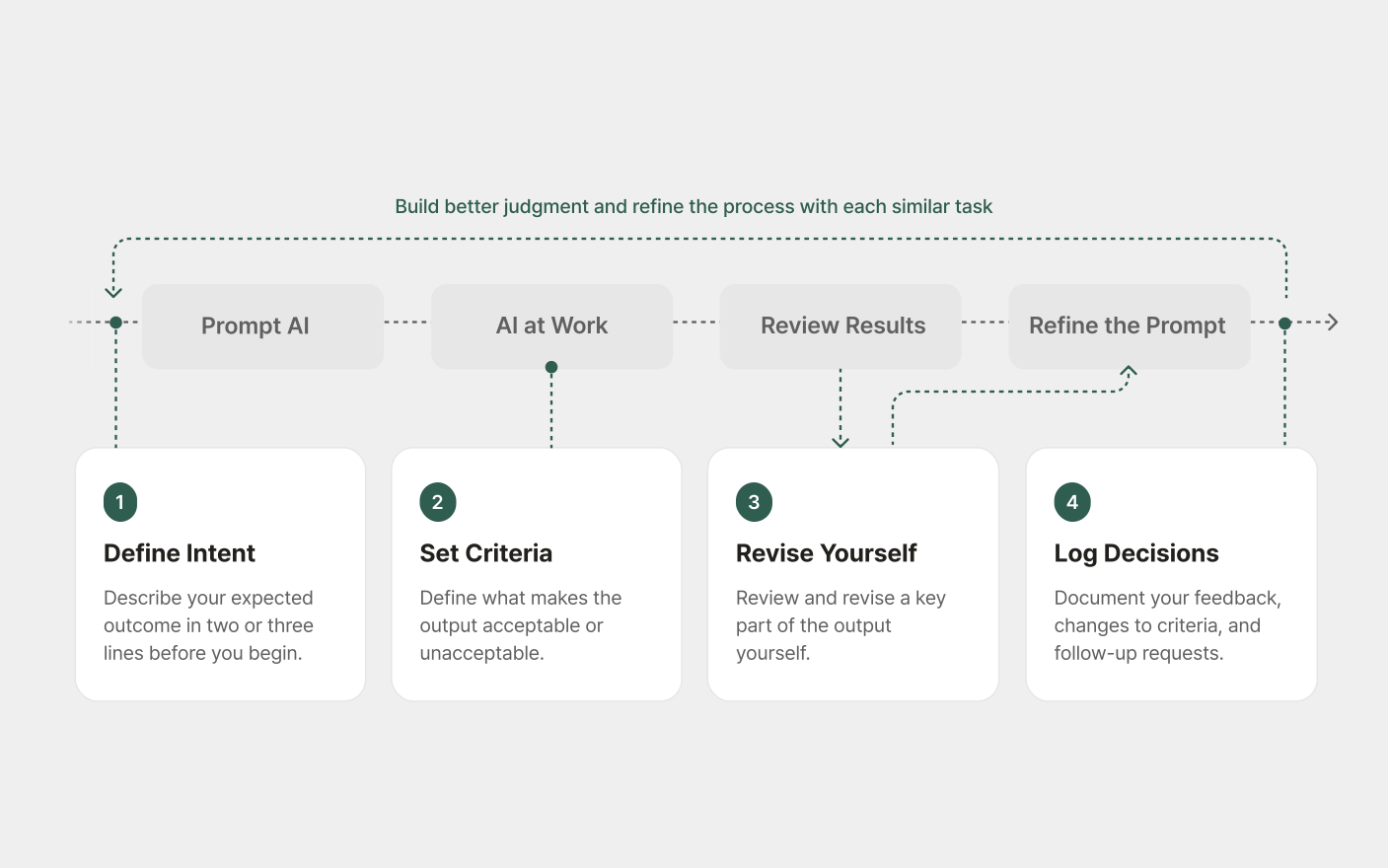
A workflow for keeping human judgment at the center of AI collaboration.
Step 1. Write down your intent before assigning the task
Before asking AI to do something, write two or three lines about what you want to achieve. They do not need to be perfect. The point is to capture your intent, not to spend a long time documenting it. This gives you a starting point for reviewing the output later.
Before requesting an onboarding design, for example, you might write:
By the second screen, users should understand why this app is relevant to them. Communicating its value should come before introducing its features.
Before asking AI to explore and design a feature, you might write:
The key metric for this feature is return usage rather than conversion. It should give users a reason to come back, beyond trying it once.
Step 2. Define your review criteria while AI works
While AI is working, take a moment to write down what would make the result acceptable or unacceptable before moving on to another project.
For a screen design, your criteria might be:
Acceptable: The primary call to action is visible without scrolling, and users can easily understand what to do next.
Unacceptable: The visual hierarchy is unclear, empty space serves no clear purpose, or the copy relies on vague claims such as “a wide range of features” or “convenient.”
For feature planning, you might use:
Acceptable: The flow covers at least three key user scenarios and accounts for situations such as payment failures or users returning to an unfinished task.
Unacceptable: It only describes what happens when everything goes as expected.
These criteria can change. It is difficult to anticipate every requirement before seeing the work. You may not get the criteria right the first time, but you can record why you revise them. Over time, those notes can help you make similar decisions more quickly.
Step 3. Create your own alternative for a key part of the work
Choose one important part of the AI-generated output and work through how you would approach it. There is no need to recreate everything.
Suppose AI proposes this onboarding sequence: feature introduction → sign-up → product experience. Focus on the timing of sign-up. Are we asking users to register before they understand the product’s value? Try outlining an alternative that lets them experience the product first and sign up afterward.
Comparing your alternative with AI’s proposal makes the trade-offs easier to see. What matters is working through a key decision yourself before accepting the result.
Step 4. Record what you changed and why
Your direction may change as you work with AI. Alongside the final output, keep a short note of what changed and the reasoning behind it.
For the onboarding example, that note might look like this:
Initial approach: Ask users to sign up before trying the product.
Concern raised during review: Asking users to register before they understand the value may discourage them from continuing.
Revised approach: Let users try the product first, then invite them to sign up when they want to keep using it.
This gives you an answer when someone later asks, “Why did we move sign-up to a later stage?” It also gives you a record of your thinking to draw on when similar questions arise.
You do not need to wait until the project ends. After a working session, ask AI to summarize what changed and why, then check that the summary accurately reflects your reasoning. The aim is to preserve the decisions you made and the reasons behind them, rather than simply archive the conversation.
Step 5. Group related tasks when working in parallel
AI can handle several tasks at once, but reviewing the results still requires your attention. It helps to organize parallel work around a shared project context.
For example, designing an onboarding flow, identifying possible error scenarios, and reviewing research on where users drop off are closely connected activities. They all concern the same users and goals, so insights from one task can inform the others.
Now imagine reviewing onboarding for a shopping app while also analyzing interviews for a hospital booking service. Each time you switch between the results, you need to recall who the users are, which problem you are solving, and what matters most. Even two tasks can become demanding when they require different frames of reference.
Sophie Leroy’s research on “attention residue” offers a useful perspective here. When we move to a new task before finishing the previous one, some of our attention can remain on the earlier task, affecting how we perform the next one.
The cost of switching is more than the time it takes to change tabs. It includes the effort of recalling users, goals, constraints, and expected outcomes.
Where possible, run related tasks together. When you need to move to another project, leave a short note about where you are and what to check next. The statement of intent from Step 1 can also help you pick up where you left off.
Food for Thought
Evaluating the work and setting the standards require our professional expertise.
AI can suggest criteria and help organize our thinking. Applying and adapting those criteria to a project still requires human judgment and accountability.
As we work with AI, we should also build our ability to explain why we made something the way we did. That is the kind of productivity worth pursuing.
This workflow may take more time in the moment. In return, it can give us greater confidence in the result—and practical knowledge to bring to the next decision.
Reference
- Lee et al. (2025). “The Impact of Generative AI on Critical Thinking.” Microsoft Research & CMU. CHI 2025.
- Reicherts, Zhang et al. (2025). “AI, Help Me Think—but for Myself.” Microsoft Research & UCL. CHI 2025.
- Shankar et al. (2024). “Who Validates the Validators?” UC Berkeley. UIST 2024.
- Slamecka & Graf (1978). “The Generation Effect: Delineation of a Phenomenon.” Journal of Experimental Psychology.
- Simkute et al. (2024). “Ironies of Generative AI.” Microsoft Research.
- Leroy (2009). “Why Is It So Hard To Do My Work?” Organizational Behavior and Human Decision Processes.
- Written by
- Yejin Lee
- Graphics by
- Eunjeong Kim(Graphic Designer)
- Edited by
- Seungyoon Lee